Walmart is the owner and developer of Spark. The app was created for Walmart to delivery its own merchandise. Not all Walmart Spark deliveries are the same. Some are tiny and some fill an entire large SUV. Some deliveries are a single order and others contain 2 or 3 separate orders batched together.
Types of Walmart Deliveries
The four types of Walmart deliveries on the Spark platform are:
Curbside Pickup
Walmart curbside pickup deliveries will be the most common type of delivery you’ll see on Spark. Deliveries can a single order, double, or triple. Most Spark drivers should be deactivated for not following the conditions of the Spark App Terms of Use but that’s another matter we won’t get into. Technically you must be able to separate three orders without mixing up the items. If you expect to be able to separate three grocery orders in the trunk of a tiny little car then you deserve to be deactivated and probably will be as soon as a customer reports that they received the wrong items. Some Walmarts require that one order go in the trunk, one in the backseat, and one in the front seat. Most stores will load the orders anywhere in our vehicle as long as you have a way of keeping the items separate such as totes, dividers, or large catering bags.
Sometimes waiting to pick up a curbside order can take over an hour. Stores that aren’t as busy will usually bring the order(s) out within a few minutes. It won’t take long to figure out if your store is seriously running behind. It’s not unusual for stores to become backed up in the mid-afternoon. Customers want to pick up groceries on the way home from work. It’s double crunch time for the store associates because that’s exactly most people want their groceries deliveries. 3 pm to 5 pm pickups usually take a lot longer at the majority of all Walmarts.
If you wait more than 10 minutes to pick up a curbside order, the app will notify you that you’re earning extra for the wait time. It’s usually only a few cents per minute when the clock starts ticking. If you wait more than an hour, the extra pay is usually around $9. You can cancel the order if it hasn’t been loaded after 10 minutes without it affecting your metrics. Some multi giggers pull into curbside, find a better paying delivery on another app, and cancel the curbside pickup within minutes of arriving. If they don’t wait the minimum time specified in the app, their completion rate drops. Eventually they’ll be deactivated.
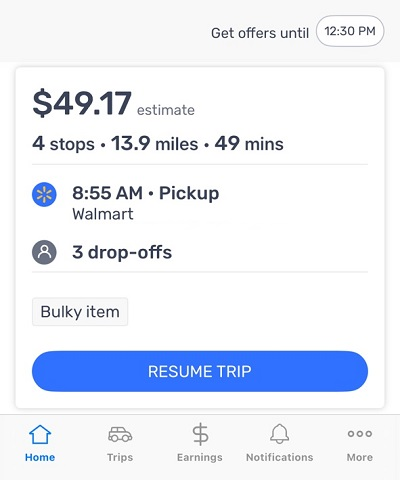
The screenshot above is for a triple curbside pickup. This particular batch was 4 stops but one stop is to pick up the orders. There were 3 drop offs. This is definitely not your average curbside pickup. Many triple deliveries pay less than $20. Base pay for a triple going only a few miles is $9. If there are no tips the total pay for delivering 3 separate orders will be 9 bucks.
General Merchandise Batches
General merchandise is non-perishable items. The items could be anything in the store except perishable food. You could have a tiny package containing vitamins along side a 44-pound bag of dog food and huge totes that take up your entire vehicle. You cannot view the items in a general merchandise batch so you have no idea what you’re picking up. This is the biggest reason to make sure you list the size of your vehicle in the app.
Most Spark drivers have their own opinions on general merchandise batches, perhaps because they want to rush back to store and grab another delivery. General merchandise batches usually take hours. The mileage is often extremely high, and the last drop sometimes leaves you an hour from the store. On the bright side, some drivers take only general merchandise batches. They’re available all day, normally starting around 9:30 a.m. On an average day, you could catch 3 GM batches back-to-back at $60-$80 each, end by late afternoon, call it a good day, and head home.
For curbside and shopping orders, the app will display a label showing items that are bulky, 40-50 pounds, and 50-60 pounds. You can click the list of items in a curbside or shopping order to see what those items are. Not true with general merchandise batches. You’ll see the label warning you of these items but you’ll have no way of knowing what the items are until the loader brings them out of the store. What makes the decision difficult ahead of time is that a bulky item could be a mega pack of toilet paper, a 55″ TV, or an area rug that’s 6 feet long.
Pharmacy Deliveries
Walmart pharmacy deliveries can either put some quick cash in your pocket or get you deactivated on your first delivery. Be sure to read this read this entire section if you’re interested in pharmacy deliveries. Unlike pharmacy deliveries on other gig platforms, Walmart deliveries don’t normally require a signature from the customer. You select the dropoff location, take the picture, and complete the delivery. However, some pharmacy deliveries require a signature but only if the customer requested it.
Pharmacy deliveries from Walmart are different from the same deliveries on other gig platforms. A selfie check is required before you can pick up the prescription and immediately after you complete the delivery. At the pharmacy counter you’ll be asked for the 4-digit code shown in the app. Once the code is confirmed you’ll scan the barcode label while the pharmacy tech is watching. That’s it. Confirm pickup and head off to deliver.
The first caveat with pharmacy deliveries is entirely on you. You need to learn the pharmacy hours! Spark constantly sends out pharmacy pickups before the pharmacy is open in the morning and during the half hour pharmacist lunch break when the pickup counter is closed. Most Spark drivers just wait for the pharmacy to open. We’re pointing out the timing in case you’re one of those drivers who doesn’t want to wait 20-30 minutes to pick up an order.
The second caveat with pharmacy deliveries is the most crucial to remember. You’ll be required to complete a selfie check before you can pickup the prescription and complete another selfie check after you drop if off. Most of the country may not encounter the following problem but in rural areas Spark drivers are being deactivated for failure to complete the selfie check. If there’s no cell service you can’t complete the selfie check. We’ve called Spark support dozens of times and have been given the same answer every time. If you’re positive you won’t be able to complete the selfie check after delivering the prescription, then CANCEL THE PICKUP because you’ll be deactivated for not completing it.
The above scenario brings us Admins back to our primary theory on delivery. Only deliver to areas you know like the back of your hand. Social media driver groups are full of posts from Spark drivers who delivered to wrong addresses because they didn’t know the area. GPS is only a tool to help you find the right address. It’s up to you to visually confirm that GPS was correct. For pharmacy orders, don’t accept a delivery unless you’re 100% sure there’s cell service at the drop off location.
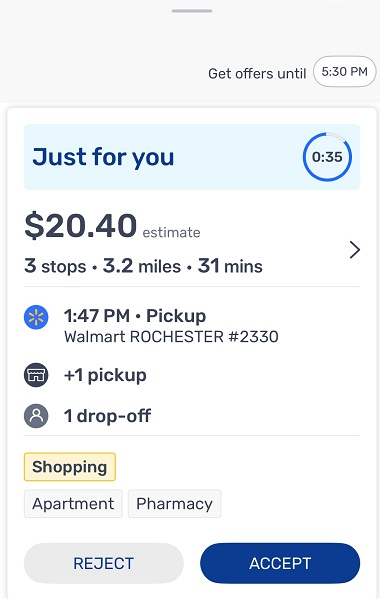
The screenshot below is for a Pharmacy and Shopping delivery. You’ll pick up the prescription(s) from the pharmacy then shop for whatever else is in the order. These are technically considered two deliveries and two drop offs, even though they’re both going to the same house. You’ll first take the confirmation picture for the prescription and complete the drop off then repeat the procedure for the regular order. If you read all of the information above, by now you also know you have to do a selfie check after completing the delivery because it contains a prescription.
Shop & Deliver Orders
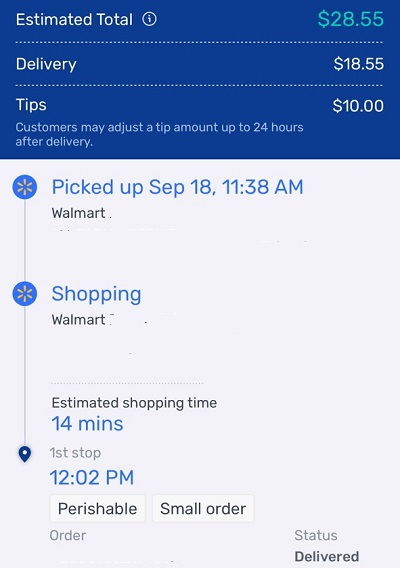
The name says it all. For this type of delivery you’ll shop for the order then deliver it. Some drivers hate shop and deliver orders. Others do only these and never take a curbside pickup. Most of us find that max earnings come from a combination of both curbside pickup and shop and deliver orders.
Since Walmart owns Spark, the app is interfaced with each store’s layout. The app will show you exactly where the item is located in the store. The location of the item shown in the app isn’t always right but it’s accurate 99% of the item. The app will show you the number of the aisle and section where the item is located. Finally they show you the exact number of the product that’s listed on the shelf label.
Since the customer is always right, shop and deliver orders will often lower your customer rating. If an item is out of stock, the customer will assume you didn’t look hard enough and leave you a low rating. If you substitute an item the customer ordered with a product Walmart recommended, the customer might leave you a low rating. There’s just no way to make every customer happy on shopping orders.
If you decide to try shop and delivery orders, beware of the customer who won’t take no for an answer. They’ll send you endless messages over items that aren’t in stock. They’ll ask if you can add items to their order, which Walmart doesn’t allow. Use your common sense. If you think the customer is being unreasonable and is likely to leave you a low rating, then cancel the order. For the reason you’re cancelling the order, be sure to mention something like “customer upset because item is out of stock.” After you cancel the order, push the cart to the customer service desk, and look for another delivery.
Metrics
Most of us believe the developers of the Spark app are the same company that runs the DoorDash app. Spark tracks the same exact metrics. The app has links to learn which metrics Spark tracks and which ones it feels are important.
On-Time Arrival At Pickup – If you accept a curbside pickup, you have until 15 minutes after the scheduled pickup time to confirm arrival at the store. In some cases you’ll be more than 15 minutes from the store when you receive the order. If you accept the offer, your OTA rate will drop because you won’t arrive on time. If the order is scheduled for pickup ASAP, you have 25 minutes to confirm arrival.
Completion Rate – While some apps track your cancellation rate, Spark tracks the opposite. This is the number of deliveries you successfully completed out of the last 100 deliveries you accepted.
Acceptance Rate – Spark is clear in its documentation that no minimum acceptance rate is required to remain on the platform. Some drivers consistently have ARs below 5%. The only deliveries that count against your AR are Round Robin offers (the ones labeled “Just For You”). Spark recently changed its policy on acceptance rates. In addition to accepting Round Robin offers, you can now accept Broadcast Offers to raise your AR. Broadcast offers are any delivery for pickup ASAP. If the delivery has a scheduled pickup time, it is not considered a broadcast offer.
Customer Rating – You have no control over your customer rating. You can complete the most perfect delivery in the history of gig work and some customers still won’t give you a 5-star rating.
Items Found – This metric applies to shop and deliver orders only. It’s the number of items ordered by customers that you found in stock. If you add a substitute, it counts as an item found. The percentage of Items Found drops only if Walmart recommended substitutes and you didn’t choose (or couldn’t find) any of them.
Incentives
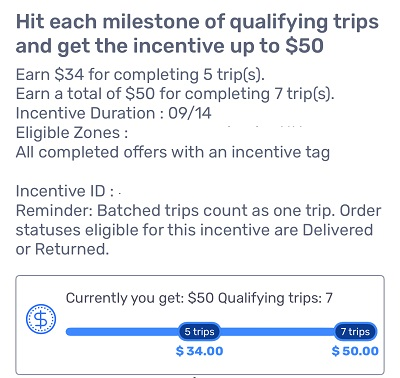
We won’t say much about Spark Incentives because they’re rapidly disappearing across the country, In some zones Spark puts out incentives to earn extra cash for completing a certain number of deliveries.
Spark has two types of incentives – Tiered (which they call Milestones) and Per Delivery. The incentive in the screenshot above was tiered. $34 for completing 5 deliveries and an additional $16 if you complete two additional deliveries.
Per Delivery incentives are just that. If Walmart’s system knows it has a ton of orders coming out first thing Sunday morning, they’ll put out an incentive for $3 extra for each delivery offer accepted during certain hours. The Per Delivery incentives pop up a lot during times when Walmart is unexpectedly slammed with deliveries. You might be delivering at 2 p.m. and suddenly receive notification of an additional $3 per delivery offer accepted starting at 3 p.m.
Pros & Cons of Walmart Spark Delivery
Pros
- Extra earnings for bulky items, heavy items, and for delivering to apartments.
- Extra earnings if you wait more than 10 minutes to pick up a curbside delivery.
- Perfect Gig To Work Mother’s Hours.
- Multiple types of deliveries to choose from.
- Labels on the offer screen warn you if you’re picking up a heavy item, bulky item, or delivering to an apartment or business.
- Huge earnings potential from Sam’s Clubs if you’re lucky enough to have one in your area.
- No need to wait for the zone to be busy in order to log on. Turn on Spark Now and start looking at the available deliveries.
- Driver Support agents are incredibly fast. They’ll usually answer your call in less than a minutes.
- Frequent incentives (in most areas of the country but not all)
Cons
- Spark deactivates more drivers than any other gig platform.
- Batch Routing software sucks with no way of rearranging deliveries in an order that makes sense.
- The customer is always right, which means the delivery person is always wrong.
- Base pay is horribly low for curbside deliveries that sometimes have 300+ grocery items.


